


Key Features
Samsung Vision AI Companion Ask your companion. Samsung Vision AI is here.
Quantum Mini LED Our advanced Mini LED technology
100% Colour Volume with Quantum Dot* Unleash cinematic colour
AirSlim Sleek, slim and seamless design
Product Descriptions
Features
The answer to true immersion
Key features at a glance


Ask your companion. Samsung Vision AI is here.
Samsung Vision AI Companion
Getting help from Samsung Vision AI Companion has never been easier —whether it’s recommending what to wear based on trending clothing styles, or finding the perfect brunch spot nearby. Responses come instantly with related video/image options to choose from, making your discovery richer and more personalised than any other AI assistant on your TV.

Ask your companion. Samsung Vision AI is here.
Information based on current viewing available on Samsung TV Plus channels only. Provides AI created content, with accuracy not guaranteed.
Voice commands recognise English, French, Spanish, Portuguese, German, Italian, and Korean, but not all accents, dialects, and expressions are recognised.
Availability of features may vary, depending on the source content and privacy settings. Requires internet connection.
Available on features on 2025 Q7F and above TVs. Feature accessible by the AI button 2026 TVs, or by the Home button (long press) on the remote control without an AI button for remote controls on 2025 TVs (Q7F and above) and 2026 Crystal UHD TVs.
Feel the power of AI in 4K*
NQ4 AI Processor
This processor is used to optimise picture and sound quality. The result is excellent performance, whether you're watching streaming services, playing your favourite video games or watching live sports.

The Samsung NQ4 AI Processor chip descends on the TV's main board and lights up with waves of power surging from the chip to the rest of the TV.
* Viewing experience may vary according to types of content and format. Upscaling may not apply to PC connection and Game Mode.

More about
Samsung Vision AI


Enjoy the match your way with AI-enhanced viewing
AI Soccer Mode
Turn on AI-driven picture and sound tuning made for soccer. Enhance player detail with clear commentary to help you follow every moment with stadium-like intensity when played through your TV speaker. With smart scene-by-scene optimization, your TV automatically helps deliver a sharp, immersive match-day experience, so you can stay locked into the game from kick-off to final whistle.*
*AI Soccer Mode sound optimization only available when audio is played directly through the TV, not through a separate sound device. Turn off AI Mode to use this feature. AI technology designed to detect and optimise soccer content only. Availability and performance will vary according to several factors including source content and application in use
Picture Quality

Our advanced Mini LED technology
Quantum Mini LED
Experience ultra-fine contrast with Quantum Mini LED, precisely controlled by Quantum Matrix Technology Core. Quantum Mini LED in concentrated zones enables you to enjoy ultra-fine contrast and extra brightness in each scene.

Unleash cinematic colour
100% Colour Volume with Quantum Dot*
Delivering 100% Colour Volume, it reproduces over a billion shades with remarkable brightness and precision, so colours stay rich, true, and lifelike in every scene.*

VDE Testing and Certification Institute evaluated. Series QN80H as 100% Colour Volume (according to DCI-P3). Test Report 336574-TL6-1, valid until 8 Feb 2027.
More about
Picture Quality


Boost shows and movies to 4K resolution
4K AI Upscaling
Watch your favorite content in brilliant detail. Our AI processor can take content and enhance it up to 4K resolution with 20 AI neural networks — all while maintaining sharp and smooth picture quality.*
* Picture quality of upscaled content will vary depending on the quality and resolution of source content and may not apply to PC connection and Game Mode.
Gaming Experience

Get smooth motion for games up to 2K 120Hz
Motion Xcelerator 2K 120Hz
Level up your gaming experience with exceptional motion enhancements up to 2K 120Hz VRR. Providing crisp visuals at high speeds, unlock peak performance in every round.* HDMI 2.1 compatibility provides access to ultra-high bandwidth for compatible devices, helping you keep ahead of the competition.*

* Requires compatible gaming PC supporting 2K resolution and 120Hz Variable Refresh Rate. 2K 120Hz only available in 55" and above, and Game Mode must be enabled. Performance may vary. Picture quality will vary depending on quality and resolution of source content.
Easily discover and access all your games from one screen
Gaming Hub
Save time and speed up the game selection process.* Stream over 100 blockbuster games with Xbox Game Pass or access other cloud gaming services – no downloads and console required.** Plus, find your console gaming and standalone apps like YouTube, Spotify, Twitch & Discord all in one place.*

* A controller may be required depending on the specific game being played on the Gaming Hub. Internet connection, additional gaming service subscriptions and third party apps (depending on game or service) may be required. Content services are subject to change without notice. Requires Samsung Account.
** Xbox Game Pass Ultimate subscription and compatible controller required. Fees apply.
More about
Gaming Experience


Play smarter with real-time gaming optimization
AI Gaming Optimizer
AI Gaming Optimizer analyses what’s on screen in real time to detect your game genre and helps apply the best settings. No digging through menus, just seamless, genre-specific optimization designed for smoother gameplay, clearer visuals, and a more enjoyable experience.*
*Feature availability varies according to console and PC games. Experience and performance may vary according to several factors including type of content, graphics processing unit, network connection speed and format.
Sound


Sound that adjusts to your surroundings & content
Adaptive Sound+
Experience sound just as the creators intended, with clear voices and vivid, balanced tones. Your TV's AI processor recognises different sounds and optimises them based on characteristics of both the room and audio content, before ultimately refining them with audio remastering technology.*
* Performance may vary depending on installation environment and surroundings.
One UI Tizen

Personalize your screen experience
One UI Tizen
Explore endless entertainment with your favourite apps in one place. With automated content curation you can spend less time searching and more time streaming the movies, games and shows you love.* Your experience is also secured by Samsung Knox across SmartThings devices. Plus, One UI Tizen will support Tizen OS upgrades for the next 7 years.*

* Internet connection and Samsung Account required. Data and subscription charges may apply. Apps and UI may be subject to change without notice. Agreement of the Smart Hub Terms and Conditions and Privacy Policy is required before use.
*Tizen OS upgrades will be provided for 7 years, starting from release year 2025.
Enjoy 7 years of new TV experiences
* Internet connection and Samsung Account required. Data and subscription charges may apply. Apps and UI may be subject to change without notice. Agreement of the Smart Hub Terms and Conditions and Privacy Policy is required before use. Kayo & BINGE not available for use in Very Remote regions of Australia.*Tizen OS upgrades will be provided for 7 years, starting from release year 2025.

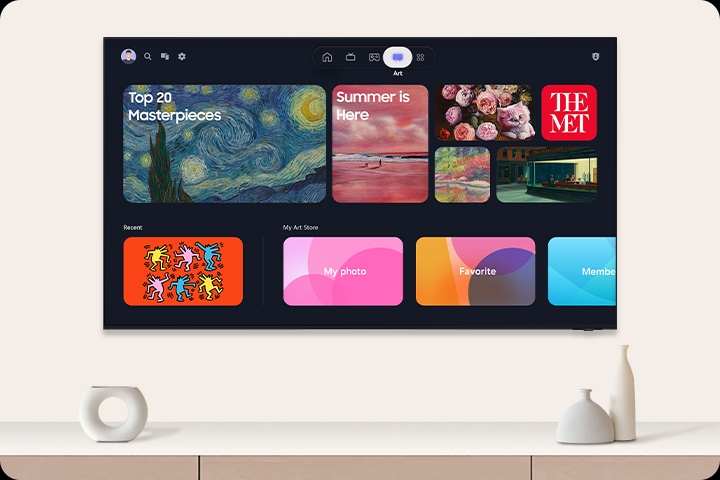
Find world famous galleries in your TV
Art Store
Now expand your art gallery to Neo QLED. With over 5,000 options from world-famous artists and institutions in the Art Store, you can easily find the right pieces to show off your style.*
* Stream complimentary curated art or additional artworks available via subscription. Internet connection required. Offering 30 refreshed artworks monthly through Art Store Streams and over 70 ambient content supported complimentary throughout the year.
Relive your favorite memories on your TV
Google Photos for Samsung TV
Google Photos is the home for all your life’s memories. Rediscover the people, trips, and life moments that matter most with daily curated memories from Google Photos, now on your Samsung TV. View your photos and videos on your TV with music, bringing your favourite highlights to life in a more immersive way.

* Requires user log in to Google Photos on the device
* Options to hide memories and enhance content filter provided
* Feature availability may vary by region and models
* Google Photos™ is a trademark of Google LLC.
More about
One UI Tizen


Access subscription free TV. Stream shows and movies you know and love.
Samsung TV Plus
Get access to subscription free TV and enjoy your favourite content on Samsung TV Plus. Watch news, sports, movies, exclusive events, K content, creators and more, live and on demand.
* Ad-supported streaming service with content subject to change without notice. Available for free on Samsung Smart TVs since 2016.
SmartThings

Connect and manage your smart home devices, all from your TV
SmartThings
Control your compatible Samsung and third-party devices through your Samsung smart TV. Monitor your electricity usage, control your lighting, be notified when your washing is finished, or view your home cameras from your couch. Designed to make your life easier, more secure, and more connected.*

A modern living room with a wall-mounted Samsung TV displaying the SmartThings dashboard, showing connected devices across different rooms. Icons around the space represent lights, air conditioning, blinds, appliances and a robot vacuum, all controlled from a single screen. The view zooms into the TV to reveal the SmartThings interface in detail. The stand-light icon is selected, and when its power button is activated, the floor lamp in the living room turns on. The interface then transitions to the blinds icon, and when its power button is activated, the living room curtains open. The view zooms back out to the full living room, now showing all connected devices active and working together. SmartThings logo, matter logo.
* Requires Samsung Account, internet connection and SmartThings enabled devices. Please visit www.samsung.com/au/apps/smartthings/ for a list of current compatible devices.
More about
SmartThings


Control your TV from your mobile phone
Quick Remote
Through your SmartThings mobile app you can access key Samsung Tizen TV features such as media, features and menu. Quick Remote can also act as your TV remote allowing you to change channels, adjust the volume, and much more right from your phone.*
* Push notifications for mobile remotes for TVs are available on (Mobile) Android OS 10.0 and higher versions with (TV) 2020 Samsung TVs and later models, and operates when the mobile device is near the TV.* Samsung Smart TV feature access is available on (TV) 2024 Samsung TVs and later models with (Mobile) Android OS 10.0 and higher versions or iOS 15.0 and higher versions.

Design

Sleek, slim and seamless design
AirSlim
Elegant slim design helping your TV blend into the wall seamlessly.

Profile view of QLED TV is on display to shows its ultra slim design.