


Product Descriptions
Features

Enhanced sound, elevated essentials

Experience comfort grounded in a proven and trusted design, shaped through advanced computational modeling and wearability testing. The ergonomic shape ensures a secure fit that reduces pressure and enhances sound, making Galaxy Buds3 FE ideal for extended wear.1

Refined tones and texture for timeless appeal
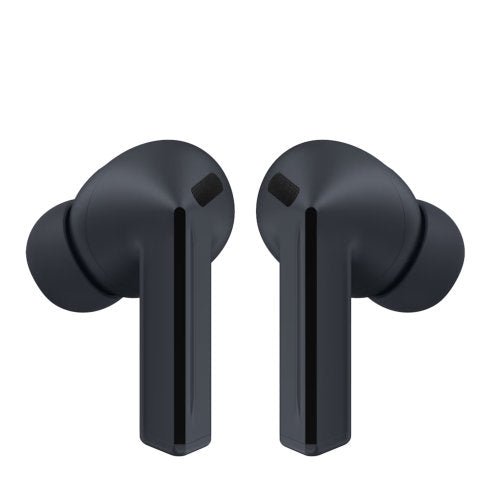
Choose between bold Black and soft Gray. Complete with a smooth matte finish, both options bring a minimalistic look with a touch of everyday sophistication.


Full-bodied sound, rich in detail
Level up your listening with dynamic and powerful sound. Featuring a larger speaker, experience fuller bass and balanced detail that add depth to each note.2
 Side view of a transparent Galaxy Buds3 FE, revealing the speaker inside the earbud. Galaxy Buds3 FE makes a slight turn with the internal speaker vibrating to represent emitted sound, and transitions from transparent to black.
Surround yourself with 360 Audio
Fill your space with deep, multidirectional sound. 360 Audio provides an expansive, spatial audio experience, creating a simulated surround sound environment that draws out the depth of each note and layer for a truly captivating listening experience.3

Clarity where it counts

Focus on your sound, tune out the noise around
Keep your world centered around your sound. Active Noise Cancellation minimizes unwanted background noise, allowing you to immerse yourself in your own soundscape — whether you’re taking a crowded subway, walking alongside traffic or sitting in a noisy café. Enjoy your personalized playlist without the distractions.4

Clear conversations, less miscommunication
Capture your voice the way it's meant to be heard. Equipped with an advanced pre-trained machine learning model for enhanced calls, it analyzes ambient sounds and voice patterns to filter out noise — keeping your voice clear and focused, even in noisy environments. Experience rich, lifelike interactions with call quality that ensures each word is delivered with clarity and precision.5
Control right from your fingertip
Change up your sound with smooth, intuitive gestures. From podcasts to playlists, switch tracks with Pinch Control — all while keeping your smartphone in your pocket.


Pinch Control
Pinch once to play or pause, twice to skip to the next track and three times to go back to the previous track.7
Quick access for effortless earbud control
Fine-tune your sound while streaming videos or using other apps. Access key functions and Galaxy Buds settings directly from the Quick Panel, making it easy to adjust noise control and audio preferences the way you see fit — all while staying on the same app. From customizing your equalizer settings on Spotify to enabling 360 Audio for YouTube, you can set and save sound settings for each app — keeping everything in tune with you.8
 A Galaxy smartphone screen is swiped down, which opens up the quick settings panel. It's zoomed in on the volume slider which is pressed for few seconds to open a widget showing Buds battery level and Active noise canceling level. Another screen is zoomed in on the Active noise canceling level widget where the ANC level slides up from left to right. Below, a widget for YouTube audio displays settings for 360 audio turned on, Equalizer balanced, Boost dialogue turned on and Loudness normalization turned off. It then changes to a widget for Spotify audio, showing a different set of audio configurations. For Spotify, the audio displays settings for 360 audio turned off, Equalizer bass boost, Boost dialogue turned off and Loudness normalization turned on. Finally, the view zooms out to show all the settings previously shown.
Talk to Gemini, right on your wrist or through your Galaxy Buds
Chat with Gemini right on your wrist or through your Galaxy Buds3 FE — for help during life’s busy moments. Simply say, "Hey Google," to activate Gemini. Then, say what you need to get answers and ideas, complete tasks across apps, remember information and receive reminders for important events, or record your workouts - all from your Galaxy Watch or Galaxy Buds.9

Hear interpreted responses and exchanges in real time
Bridge language gaps in your conversations with Galaxy AI's Interpreter. Hear translations in real time and stay focused on your conversations without glancing at your phone screen. Now, you can enjoy hands-free interpretation wherever you go.



Quick to pair. Ready to switch

Connect in seconds. Listen for hours
Connect your Galaxy Buds3 FE to your Samsung Galaxy devices with ease. Simply open the charging case to start pairing automatically, tap or click 'Connect' on your device — and you're ready to go.10

Sound in sync with your devices
Move between devices without interruption. With Auto Switch, Galaxy Buds3 FE actively detects audio activity and transfers the connection seamlessly for continuous listening across all of your Samsung Galaxy devices — including your Galaxy Book to deliver the same Auto Switch experience as Galaxy Buds3 Pro and Galaxy Buds3.11


