


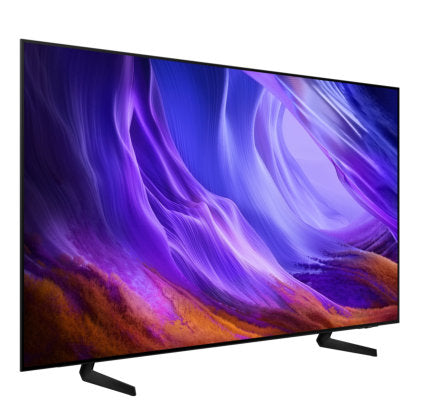
Key Features
Samsung Vision AI Companion Ask your companion anything. Samsung Vision AI is here.
OLED HDR Pure contrast radiating from each pixel
Premium Gaming Pack Next-level gaming performance from start to finish
Features
The answer to ultimate immersion
Key features at a glance


Ask your companion anything. Samsung Vision AI is here.
Samsung Vision AI Companion
TV becomes an intelligent companion, with Vision AI Companion redefining screen interaction. Backed by 20+ years of TV insight, Vision AI Companion delivers context-aware, rich and dynamic answers — enhanced by leading AI agents like Gemini and Perplexity — all without interrupting what's on screen. It seamlessly adapts to daily routines, whether it's catching up on morning updates, tracking live sports moments, finding great nearby spots or discovering more about on-screen content. With AI, picture, sound and generative features are seamlessly connected and continuously evolving.

A person sits on a sofa in a living room watching a large Samsung TV displaying an astronaut standing on a beach. A close-up highlights the viewer pressing a button. The TV transitions to the Vision AI Companion home screen as content cards and app icons animate into view from different directions around the room. Various personalized content cards — including news, sports, recipes, entertainment, weather, and educational content — float around the viewer, showcasing AI-powered content discovery and recommendations. The floating content cards rapidly converge toward the TV screen, illustrating Vision AI Companion organizing information based on user interests. The Vision AI Companion interface appears on the TV with a personalized greeting, suggested prompts, live information, and integrated AI services, including Perplexity. Close-up of the TV screen.
For illustrative purposes only. Feature available in certain regions and models. Availability, supported features and user interface may vary by country, region, model and viewing conditions. Voice commands recognize English, French, Spanish, Portuguese, German, Italian and Korean, but not all accents, dialects and expressions are recognized. This feature provides AI-created content, with accuracy not guaranteed — please check results. Requires certain Bluetooth remote (sold separately on some models). In-box remote for some models does not support voice recognition. Requires either a Mobile Quick Remote or separately purchased Bluetooth remote. Feature accessible via the AI button, or the Home button (long press) on remote control without an AI button.
More about
Samsung Vision AI


Your command, your match — AI-enhanced football viewing
AI Football Mode
With AI Football Mode, you can watch football with picture and sound settings designed specifically for the sport. AI-driven optimization delivers richer colors, dynamic contrast and crystal-clear commentary — so you can follow the game's passes and cheers with professional-level clarity.
Feature availability and performance may vary depending on the content viewed and the apps used.
Feel the full power of AI in 4K
NQ4 AI Gen2 Processor
The NQ4 AI Gen2 Processor uses the power of 20 AI neural networks to optimize picture and sound quality. The result is impressive performance, whether you're streaming shows, playing video games or watching live sports.

Samsung NQ4 AI Gen2 Processor chip descends on the TV's main board and lights up with waves of power surging from the chip to the rest of the TV.
Viewing experience may vary according to types of content and format. Upscaling may not apply to PC connection and Game Mode.

Picture Quality


Pure contrast radiating from each pixel
OLED HDR
Our processor analyzes each scene and boosts for brightness. Working with self-illuminating pixels, OLED HDR provides a beautifully bright screen with improved contrast, which brings hidden details to light.

The range of HDR luminance is based on internal testing standards and subject to change according to viewing conditions or specifications.
A new dimension of cinematic experience with each detail intelligently optimized
HDR10+ ADVANCED
HDR10+ ADVANCED goes beyond the limitations of legacy metadata to bring the creator’s artistic vision to life. It delivers enhanced brightness without clipping, while advanced features—from Local Tone Mapping to Intelligent Motion Smoothing—work seamlessly together to enrich color and reveal strikingly lifelike detail. Genre-based optimization further fine-tunes the picture for every type of content. The result is a truly elevated entertainment experience, every time.

A new dimension of cinematic experience with each detail intelligently optimized
Actual performance may vary depending on content type, source quality, and viewing conditions.
HDR10+ ADVANCED content availability and performance may vary by OTT service, content, and region.
HDR10+ ADVANCED is currently available on certain services. The content that supports HDR10+ ADVANCED can be identified by the logo within those services.
Deep blacks, clean whites and lively colors
OLED
Samsung’s unique OLED expresses deep blacks, clean whites and a full range of lively colors. With cutting-edge, self-illuminating pixels, what you see is a picture that's pure, bright and always stands out.

More about
Picture Quality


Upscale content into a 4K experience
4K AI Upscaling
Watch your favorite content in more brilliant detail with 4K AI Upscaling. The NQ4 AI Gen2 Processor can take content and enhance it up to 4K resolution with 20 AI neural networks — all while maintaining sharp and smooth picture quality.
Viewing experience may vary according to types of content and format. 4K AI Upscaling may not apply to PC connection and Game Mode.
Gaming Experience

Next-level gaming performance from start to finish
Premium Gaming Pack
With Premium Gaming Pack, gameplay feels immersive from start to finish. It enhances your setup with features designed for smooth and responsive play. Motion Xcelerator 120Hz, NVIDIA G-SYNC and AMD FreeSync Premium work together to keep motion clear and fluid, reducing tearing for smoother, stable visuals.

Viewing experience may vary according to types of content and graphics processing unit, as well as network connection speeds and ping levels when gaming on the cloud. NVIDIA G-SYNC compatibility requires connection to a compatible NVIDIA graphics card and may require enabling VRR settings in both the TV and GPU driver settings. Performance may vary depending on system configuration.
Get motion clarity games up to 120Hz
Motion Xcelerator 120Hz
'With exceptional motion enhancements, Motion Xcelerator 120Hz provides differentiated motion performance to support VRR games up to 4K 120Hz, so you can conquer your opponents — even in fast‑paced gameplay.
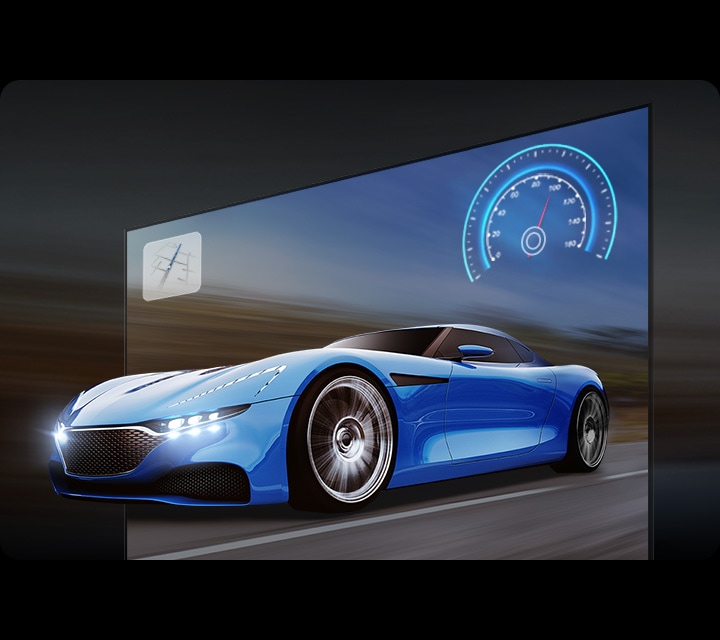

Ultra-smooth, ultra-fast responsive gameplay
G-Sync Compatible
Validated by NVIDIA to provide a good variable refresh rate (VRR) experience for tear-free, stutter-free gaming. Technology that reduces screen tearing and stuttering which provides smoother gameplay and enhanced immersion.

Tear-free, stutter-free, low latency HDR gaming
FreeSync Premium
Built on AMD FreeSync™ core technology to reduce stutter and screen tearing, AMD FreeSync™ Premium provides a true HDR gaming experience. It produces exceptional high dynamic range visuals while maintaining low latency for effortlessly smooth gameplay.
More about
Gaming Experience


Play smarter — perfect settings, every match
AI Gaming Optimizer
'Dive straight into the action with AI Gaming Optimizer. Using real‑time screen analysis, it instantly recognizes your game’s genre and applies the optimal settings automatically — no menus, no hassle, just seamless, genre‑optimized performance.
The videos were generated with the assistance of AI tools.
Sound

Surround sound that pulls you into the scene
Dolby Atmos®
Dolby Atmos surrounds you with multi-dimensional sound that pulls you deeper into the action. By projecting audio with heightened depth and clarity, your TV delivers an impressive listening experience that feels rich, spacious and remarkably lifelike.

In a living room, a couple sits on a sofa and watches TV. The TV’s front speakers are lit up and soundwaves emanate from a TV’s side and up-firing speakers, travelling in multiple directions to surround the couple in a dome of sound and fill the room. Dolby Atmos logo.
More about
Sound


Sound optimized and remastered to your content and space
Adaptive Sound Pro
Listen to sound just as the creators intended, with clear voices and balanced tones. Your TV's AI processor recognizes different sounds, like dialogue and background music, and optimizes them for their type and your room's acoustics, before ultimately refining them with audio remastering technology.
Experience may vary depending on the content and environment.
Design

A fluid, elegant design
Contour Design
Contour Design features a sleek unibody that connects seamlessly from top to bottom. Its fluid, wave-inspired silhouette creates a graceful sense of motion, bringing an elegant touch that blends naturally into your space.

Front view zoom-in on a Samsung OLED TV, then shifts to a side angle to highlight its sleek, refined contour design.
One UI Tizen

Personalize your screen experience
One UI Tizen
One UI Tizen delivers a seamless and consistent Samsung device experience. Samsung Tizen OS lets you take advantage of the latest innovative Samsung features — including quick access to the content you love, convenient AI management and powerful protection with Samsung Knox Security. Plus, One UI Tizen will support Tizen OS upgrades for next seven years, bringing you the latest apps & services.

Content and services may vary by region and are subject to change without notice. Agreement to Smart Hub Terms and Conditions and Privacy Policy is required before use. Some content and services require registration and subscription. Requires Samsung account. Tizen OS upgrades will be supported for up to 7 years starting from 2026, for products released in the year 2026. Please note that the upgrade does not cover hardware-related performance, features or durability.
Enjoy 7 years of new TV experiences
Content and services may vary by region and are subject to change without notice. Agreement to Smart Hub Terms and Conditions and Privacy Policy is required before use. Some content and services require registration and subscription. Requires Samsung account. Tizen OS upgrades will be supported for up to 7 years starting from 2026, for products released in the year 2026. Please note that the upgrade does not cover hardware-related performance, features or durability.
Relive your favorite memories with Google Photos for Samsung TV
Google Photos for Samsung TV
Google Photos is the home for all your life’s memories. Rediscover your favorite photos, both new and old, with daily curated memories from Google Photos and enjoy seeing the people, trips and activities that matter most on your Samsung TV.

Requires user login to Google Photos on the device. Options to hide memories and enhance content filtering are provided. Feature availability may vary by region and model.
More about
One UI Tizen


Access useful info throughout the day even when your TV is off
Now Brief
Stay informed even when the TV is off. Your daily info screen uses widgets to show what matters at a glance — including the weather, daily agenda, reminders and smart-home updates. Activated by voice or when you approach your TV, it delivers information right when you need it.
Supported widgets vary by region and are subject to change without notice. Detection occurs when an adult-sized object moves approximately 30 cm or more within about 2 meters of the TV. Detection performance may vary depending on the surrounding environment.
SmartThings

Do the SmartThings!
SmartThings
Optimize your home devices for a smarter lifestyle. Enjoy a customized smart home experience with thousands of SmartThings-compatible devices that simplify your day-to-day life.

A modern living room with a wall-mounted Samsung TV displaying the SmartThings dashboard, showing connected devices across different rooms. Icons around the space represent lights, air conditioning, blinds, appliances and a robot vacuum, all controlled from a single screen. The view zooms into the TV to reveal the SmartThings interface in detail. The stand-light icon is selected, and when its power button is activated, the floor lamp in the living room turns on. The interface then transitions to the blinds icon, and when its power button is activated, the living room curtains open. The view zooms back out to the full living room, now showing all connected devices active and working together. SmartThings logo, matter logo.
Images simulated for illustration purposes. Available technology, functions and features may vary by country, service provider, network environment or product, and are subject to change without notice. Requires a Wi-Fi, Bluetooth or other wireless network connection and login to Samsung account. Connected devices are sold separately. UI is subject to change without prior notice.
More about
SmartThings


Control your TV straight from your phone
Quick Remote
With Quick Remote in the SmartThings app, your phone works as a remote, letting you change channels, manage volume and more — straight from your mobile device. You can also access key Samsung Tizen TV features, explore media and adjust settings with ease.
Push notifications for mobile remotes for TVs are available on (Mobile) Android OS 10.0 and higher versions with (TV) 2020 Samsung TVs and later models, and operate when the mobile device is near the TV. Samsung Smart TV feature access is available on (TV) 2024 Samsung TVs and later models with (Mobile) Android OS 10.0 and higher versions or iOS 15.0 and higher versions.
Sustainability

Designed for everyone, accessible to all
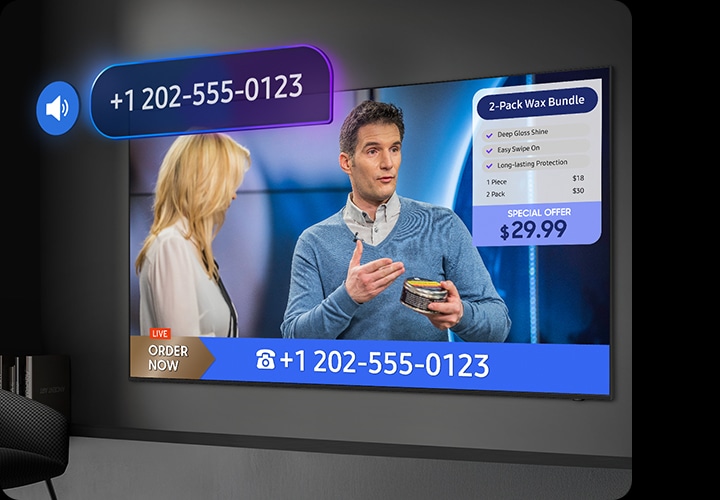
Audio Phone Number
Easily access contact info with Audio Phone Number. This feature recognizes phone numbers shown during home shopping broadcasts and reads them aloud, helping viewers with low vision place orders with greater ease.
The recognized numbers may not be accurate. Feature available on terrestrial, cable, and Samsung TV Plus. To activate, enable "Audio Phone Number" via Settings > General & Privacy > Accessibility > Audio Screen > Audio Phone Number or Accessibility Shortcut > Audio Phone Number. Press the "OK" button on the remote during a relevant scene to trigger the feature.
Charge it with light
Solar Cell Remote
With a solar panel on its back, our Solar Cell Remote is charged by light — no need for disposable batteries. And with smart features like a built-in microphone and voice assistant, this remote is innovative in more ways than one.